How to add a listing to Äriportaal?
Äriportaal.ee is Estonia’s first classifieds portal where business sellers, buyers, investors and people looking for commercial premises meet. Here you’ll find both offers for businesses and business projects as well as listings for selling and renting commercial properties and land.
Adding a listing to Äriportaal is simple and fast — just follow these steps.
1. Click “Add listing”
If you’re not registered yet, you’ll first be redirected to create an account. If you’re already logged in, you can go straight to the listing form where you first choose the appropriate category.
2. Register with your email
You can register to Äriportaal quickly and securely with your email address. Registration only takes a moment and allows you to manage your listings, edit them and update them.
3. Choose the listing type
Äriportaal has seven listing categories:
- Rent land – for using land for cultivation or a business project.
- Sell business / business project – when you want to sell an operating business or an idea with potential.
- Buy business / business project – when you’re looking for a suitable business or project to invest in.
- Looking for an investor – when you need capital to grow your business.
- Sell commercial property – offices, production buildings, retail or service premises.
- Rent commercial property – for entrepreneurs looking for premises for business activities.
- Sell land – development plots, industrial areas or commercial land.

4. Fill in the listing fields
Each listing type has its own fields, depending on what you’re adding. Be sure to include:
- sale or rental price
- description
- location
- and other important details
The clearer and more precise your listing is, the easier it is for potential buyers or partners to understand it.
Tip: a text-only listing without any images can feel “cold” and may go unnoticed among competing offers. Even one or two well-chosen photos make a big difference.
- For commercial properties and land: use quality photos of the interior and exterior, the area and access roads. It’s best if the photos are taken in daylight, in clear weather and in a tidy space.
5. Choose highlighting (optional)
You can highlight your listing right during the submission process. Highlighting helps your listing stand out and reach more interested people.
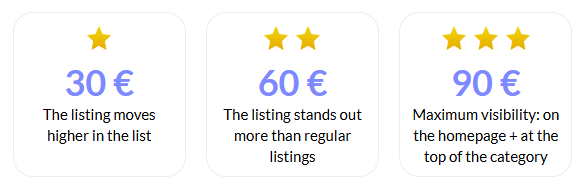
6. You can always edit the listing
After publishing, you can edit, update or supplement your listing at any time for free. This gives you flexibility to keep your offer up to date and bring out important changes.

Äriportaal – a bridge between entrepreneurial people
Our goal is to connect people and ideas that create new opportunities.
Whether you are selling a business, buying one or looking for an investor – Äriportaal is your bridge to the next successful step.
Use the opportunity and add your listing to Estonia’s first business portal where sellers, buyers and investors meet.
👉 Add your listing today and give your business a new direction.
See also: How to write an offer that actually brings clients?
If you have questions, check the FAQ page or contact our customer support.
Frequently Asked Questions
Äriportaal is for everyone who wants to sell, buy or develop business activities. The portal is used by entrepreneurs, investors, real estate developers, as well as people looking for new business opportunities — whether it’s a company, business project, online store, commercial space or a plot of land.
Äriportaal is Estonia’s first classifieds platform that focuses only on business. Here, sellers, buyers and investors meet in one secure and clear environment. Adding a listing is free, the site is well visible in search engines, and the highlighting options help your offer reach the right audience faster.
A business project is an idea or an ongoing venture that has business potential but may not yet be a registered company. It can be, for example, a development project, production concept, service, franchise offer, or a completed/ongoing online store for which a buyer, partner or investor is being sought.
When adding a listing, you can choose the duration: 30, 90, 180 or 365 days. After the period ends, the listing will expire automatically.t.
Yes. To ensure reliable communication and management, listing is only available to registered users.
Click “Forgot password” on the login page and follow the instructions.